This series of notes is about my experience learning and configuring a Kubernetes cluster. Previously, I used a single Virtual Machine to host all my web applications. However, they have become cumbersome to keep track of and are hard to deploy and update. In addition, cloud technologies are in trend and something I want to get practical and theoretical experience on.
2023-02-05 22:16:47.141236+00
Kubernetes is an open-source system for automating deployment, scaling, and managing containerized applications. The multiple standalone VMs can be replaced by worker nodes (machines) in the Kubernetes cluster, which are maintained and operated by a single centralized control plane node. As a result, the maintainer(me) only works against a single node, contrary to connecting to several VMs. It also simplifies the deployment process because deployments in Kubernetes are usually released using manifest files and container repositories (e.g., Docker Hub). Lastly, it provides options for centralized logs, metrics, and far more features.
Firstly, I had to select a Web Service provider to host the VMs used as nodes in the cluster. After some research, I decided to use AWS's EC2 instances because of their price and AWS being the most popular provider selected by developers. To further reduce cost, I opted into a Saving Plan for three years, resulting in a total price tag of approximately 20$ / month for three VMs with two Gib Memory and two vCPUs.
After that, I began configuring the VMs, by installing the required libraries and packages to use Kubeadm. These commands combine scripts from different tutorials, referred to under References. The combination process consisted of many trials and errors using the tutorials as they didn't work as expected. My working script is lengthy, so I decided to post a separate article for the setup commands. In short, they consist of downloading and running a container runtime and fetching the Kubeadm library.
Thirdly, I initialized the Kubernetes cluster using Kubeadm. Kubeadm configures most options using the given command:
sudo kubeadm init --control-plane-endpoint="<PUBLIC IP_ADDR/DNS>" --pod-network-cidr=192.168.0.0/16 --node-name=master
After the cluster had finished initializing, other VMs could join and become worker nodes by executing the command provided by the result of the following command:
kubeadm token create --print-join-command
However, the communication between the worker nodes and the controller node did not work out of the box. Kubernetes requires a CNI (Network Plugin) before they can talk with each other. In short, it is like a virtual network inside the cluster that, for instance, provisions internal IP addresses, controls/secures internal communication, and manages the connection between the controller node and the worker nodes. The most popular option is Calico by Tigera, which is open-source and recommended by all the tutorials I used.
When I applied the Calico plugin, it should have created one pod (container) for each worker node responsible for configuring the communication to and from that node. However, a problem occurred where the pods did not reach their desired states, and the worker nodes could not communicate with the controller node. After many trials and errors, including resetting all VMs and a lot of research, I found the problem: the controller VM refused inbound traffic on port 179, which must be open for Calico to work. Calico worked after I updated the inbound policy in the AWS console.
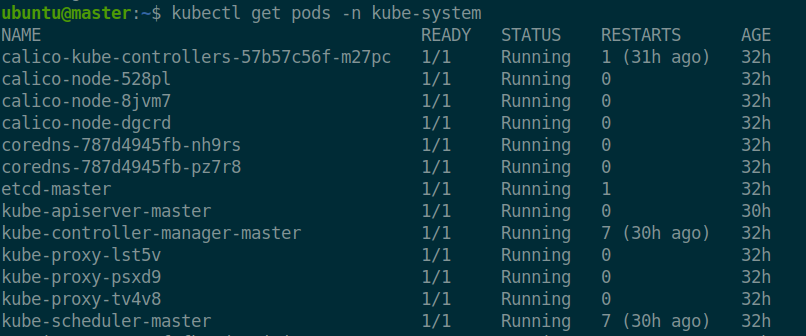
After I completed the initial configuration, the following pods ran in the kube-system namespace:
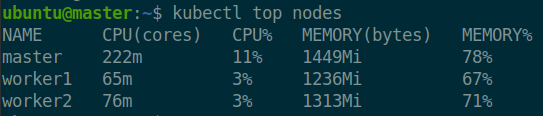
The first monitoring plugin I added was a Metrics Server. It provides information about the CPU and memory usage of all pods and all nodes. Since the worker nodes are limited by memory and CPU, it gives me information about available resources and if I need to expand the cluster. The plugin runs on port 4443, so I had to open a new inbound port in the AWS console, similar to the Calico plugin.
Secrets is by default only encoded using Base64. However, Kubernetes provides options for symmetric encryption using pre-defined keys and algorithms called EncryptionConfiguration. The secrets are encrypted when stored and decrypted when used(mounts in pods). In the future, I want to improve further by using an external provider. Important to note that the provider selection is from top to bottom, meaning that Kubernetes will encrypt the secrets using the encryption provider listed at the top under providers. In my case, it selects the secretbox provider.
apiVersion: apiserver.config.k8s.io/v1
kind: EncryptionConfiguration
resources:
  - resources:
      - secrets
    providers:
      - secretbox:
          keys:
            - name: key
              secret: MOvM/bdzZaJcipNJpynNqrrwLctOJ1c/lWxT6MsU3a0=
    - identity: {}
Install kubeadm
Install containerd
Kube Config 1
Kube Config 2
Kube Config 3